You know the problem. A prospect asks about income riders, and you've explained it 300 times. You could do it in your sleep. But this time, they need to hear it before the meeting, or they'll show up confused and defensive. Or maybe you just met someone at a networking event who asked about estate planning, and you want to stay top of mind without being pushy. That's where financial advisor video content becomes a leverage tool - not a marketing gimmick.
Video isn't new. But most advisors either avoid it completely or use it wrong. They think it's about going viral or building a personal brand. It's not. For insurance agents and annuity professionals, video is a client education tool that reduces friction in the sales process. It answers questions before they're asked. It warms up cold prospects. And it gives you a way to stay present without adding hours to your week.
Why Financial Advisor Video Content Works Better Than Text
People don't read anymore. Not really. They skim. They scroll. They abandon emails halfway through the second paragraph. But they'll watch a 3-5 minute video if it promises to answer a specific question.
Video does three things text can't:
- It conveys tone and intent instantly
- It builds familiarity without requiring a live meeting
- It gets consumed on mobile during downtime
When you send a video explaining fixed indexed annuities, you're not just sharing information. You're giving the prospect a low-pressure way to engage with you. They can watch it twice. Pause it. Share it with a spouse. And when they come to the meeting, they're educated, not defensive.
Video marketing for financial advisors has become essential for connecting with new clients because it meets them where they already spend attention: on their phones, in short bursts.
The Real Use Case for Advisors
Forget YouTube fame. That's not the game here. Financial advisor video content works when it's transactional: you send it at a specific moment in the client journey to move them forward.
Here's what that looks like in practice:
- Pre-meeting education - Send a video explaining the topic before the appointment so they show up informed
- Post-networking follow-up - After you meet someone, send a relevant video instead of a generic "nice to meet you" email
- Nurture sequences - Drip educational videos to prospects who aren't ready to meet yet
- Referral introductions - Give your clients a video they can forward to friends instead of asking them to explain what you do
Notice none of these are about "content marketing" or "thought leadership." They're about reducing the number of times you have to repeat yourself and making it easier for people to say yes.

What to Actually Record
You don't need a studio. You don't need a script. You need a list of the 10 questions prospects ask most often and a willingness to hit record.
Start here:
| Question Type | Example Topics | Video Length |
|---|
| Product education | "What is an income rider?" | 60-90 seconds |
| Process clarity | "What happens in our first meeting?" | 45-60 seconds |
| Objection handling | "Why annuities get a bad reputation" | 90-120 seconds |
| Scenario planning | "How to plan for long-term care costs" | 2-3 minutes |
The goal isn't to close the sale in the video. It's to answer the question clearly enough that they trust you to continue the conversation.
Most advisors overthink this. They want perfect lighting and a teleprompter. But prospects don't care about production value. They care about clarity and relevance. A selfie-style video recorded on your phone, standing in your office, explaining one concept clearly, will outperform a polished generic video every time.
Where to Host and Distribute
You have options, but don't overcomplicate it. The distribution method matters more than the platform.
Hosting:
- YouTube (unlisted) - Free, reliable, easy to embed and share
- Vimeo - Cleaner player, no ads, good for embedding on your site
- Platform-native tools - Many CRMs and email platforms now support video hosting
Distribution:
- Email (linked or embedded)
- Text message (as a link)
- LinkedIn DM or post
- Shared by clients to their network
The key is making it frictionless to watch. Don't require a login. Don't gate it behind a form. Just send the link and let them consume it.
When you're ready to scale this, effective video marketing strategies help advisors organize content into repeatable systems rather than one-off recordings.
Building a Video Library That Actually Gets Used
Random videos don't help you. You need a curated library organized by use case and stage of relationship. Think of it like a playbook - not a content dump.
Here's how to structure it:
Category-Based Organization
Group your videos by the problems they solve or the products they explain:
- Annuities - Fixed, indexed, income riders, surrender charges
- Life insurance - Term vs. permanent, living benefits, estate planning
- Retirement income - Social Security timing, pension options, withdrawal strategies
- Estate planning - Trusts, beneficiary mistakes, probate avoidance
- Healthcare - Medicare supplements, long-term care, HSAs
- Business protection - Key person, buy-sell, executive benefits
Each category should have 3-5 core videos that answer the most common questions. That's it. You're not building a Netflix library. You're building a tool you can actually deploy in real conversations.
If you're working with an IMO or FMO, this is where standardization matters. Everyone on your team should have access to the same video library so messaging stays consistent and compliance stays clean.

Templates and Sequences
Once you have individual videos, package them into sequences for common scenarios:
New prospect sequence:
- Introduction video (who you are, who you serve)
- Process overview (what to expect when working together)
- Topic-specific education (based on their stated need)
Referral introduction sequence:
- Thank you video (to the referrer)
- Introduction video (sent to the referred prospect)
- Educational video (relevant to the referral's situation)
Stalled prospect re-engagement:
- Check-in video (personal, casual)
- New information video (recent change in law, rates, or strategy)
- Invitation to reconnect (low-pressure calendar link)
This is where most advisors get stuck. They record a few videos, send them randomly, and wonder why nothing happens. The power is in the system, not the individual asset.
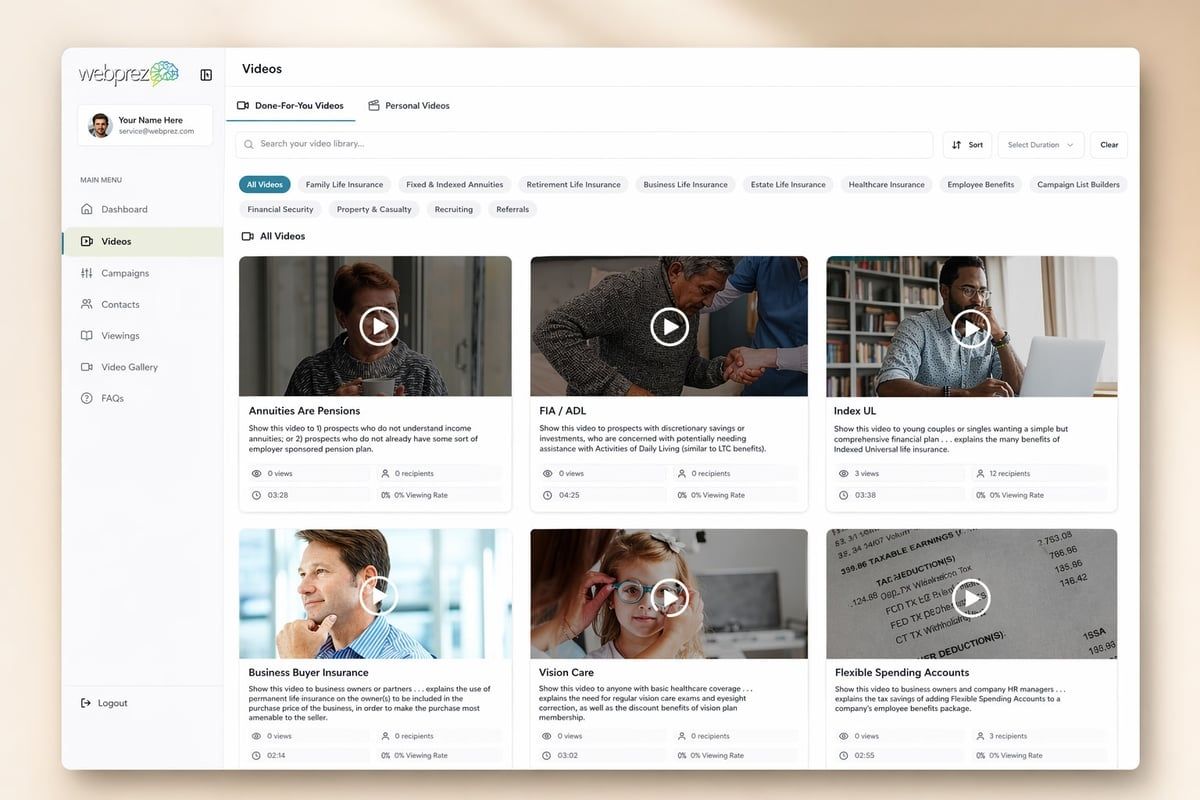
The WebPrez Video Library gives advisors access to 150+ pre-built videos across 10 categories so you don't have to create everything from scratch - just deploy what's already proven to work.
How to Use Video Without Being Annoying
Nobody wants to be the advisor who blasts video links like a desperate biz dev rep. The rule is simple: only send a video when it directly answers a question they've asked or a need they've expressed.
Here's the decision tree:
- Did they ask about a specific product or strategy? → Send the relevant education video
- Did you just meet them and they're not ready to schedule? → Send a process overview video
- Have they gone quiet after an initial meeting? → Send a check-in video, not a sales pitch
- Did they express confusion about something? → Record a quick custom video addressing it
Notice the pattern? Every video has a trigger and a purpose. You're not broadcasting. You're responding.
Personalization vs. Scale
You don't need to record a custom video for every single person. That's not scalable. But you should introduce the video with a personalized note.
Bad: "Here's a video about annuities."
Good: "You mentioned your CDs are maturing and you're looking for safety with better returns. This 3-minute video explains how fixed indexed annuities work - might be worth a look before we meet Thursday."
The video itself can be evergreen and used for dozens of prospects. The context you wrap around it is what makes it feel personal and relevant.
Compliance and Video Content
Let's talk about the part that makes everyone nervous. Yes, video content falls under the same compliance rules as any other marketing material. No, that doesn't mean you can't use it.
What You Can and Can't Say
| Safe Territory | Risky Territory |
|---|
| How a product works | Specific return projections |
| Common use cases | Testimonials or guarantees |
| Process explanations | Comparisons to named competitors |
| General education | Tax or legal advice |
Measuring What Matters
You can track everything with video. Views, watch time, click-through rates, geographic location. But most of that is noise.
The only metrics that matter:
- Did they watch it? (yes/no)
- How much did they watch? (completion rate)
- Did they respond? (meeting booked, question asked, email reply)
If 50% of prospects watch at least 60% of the video, you're in good shape. If they watch 10 seconds and bail, the video is either too long, too generic, or not relevant to what they asked about.
Some platforms give you view notifications in real time. That's useful for follow-up timing. If someone watches your video at 9 PM on a Tuesday, you can send a text the next morning: "Saw you checked out the video on income riders - any questions?"
That kind of responsiveness turns video from a broadcast tool into a conversation starter.
Common Mistakes Advisors Make with Video
Let's save you some time. Here are the mistakes I see most often:
Mistake 1: Making it About You
Nobody cares about your credentials. They care about whether you can solve their problem. Lead with the problem, explain the concept, and end with a soft invitation to continue the conversation.
Mistake 2: Trying to Close in the Video
Video is a nurture tool, not a closing tool. If you're asking for the sale in the video, you're doing it wrong. The goal is to build trust and move them to the next step - usually a meeting or a phone call.
Mistake 3: Inconsistent Quality
You don't need perfect production, but you do need consistent audio and lighting. A quiet room and natural light are enough. If the audio is garbled or the lighting makes you look like a hostage video, they'll click away.
Mistake 4: Not Having a Follow-Up Plan
Sending a video and then disappearing is pointless. Every video send should have a follow-up plan:
- Wait 2 days → Check if they watched → Send a follow-up text or email
- If no response after 5 days → Send a different video or a calendar link
- If they watched but didn't reply → Call them
The video is the tool, not the strategy. The strategy is the sequence around it.
Integrating Video into Your Existing Workflow
You don't need to rebuild your entire marketing system. You just need to add video at key friction points.
Where to start:
- Identify your top 5 most-asked questions - Record a 60-90 second answer to each
- Add video to your post-meeting follow-up email - "Here's a quick recap of what we discussed"
- Create a welcome sequence for new prospects - 3 videos that introduce you, your process, and your philosophy
- Give your COIs something to share - A 30-second video they can forward to introduce you
Once those are working, expand into more advanced sequences and category-specific content.
The Smart Money System is built around this idea - using structured frameworks to turn complex conversations into repeatable, scalable processes. Video fits naturally into the Discovery → Snapshot → Blueprint flow.

FAQ
How long should financial advisor video content be?
Keep most videos between 2-4 minutes. That's long enough to explain one concept clearly but short enough that prospects will actually watch it. If you're tackling a complex topic, 3-5 minutes is acceptable, but anything longer and you're better off breaking it into multiple videos. Attention spans are short - respect that.
Do I need to appear on camera or can I use screen recordings?
Not necessarily. The goal is clarity, not face time. Screen recordings work well for walking through documents, charts, or concepts that benefit from a visual — and a clear voiceover explanation can build just as much credibility as an on-camera delivery. Where appearing on camera genuinely helps is in moments that are inherently personal: a quick follow-up after a meeting, a check-in with a stalled prospect, a thank-you to a referral partner. For everything else, use whatever format communicates the concept most clearly.
How do I get clients to actually watch the videos I send?
Context is everything. Don't just drop a link. Explain why you're sending it: "You asked about the difference between term and whole life - this 3-minute video breaks it down clearly." Send it at a logical moment in the conversation, not randomly. And follow up if they don't watch - sometimes people just need a nudge.
Can I use the same video for multiple prospects?
Absolutely. That's the whole point. Record once, use repeatedly. The personalization comes from when you send it and how you introduce it, not from creating custom videos for every person. Build a library of evergreen content and deploy it strategically.
What equipment do I actually need to create good financial advisor video content?
Your smartphone is enough. Seriously. Find a quiet room with natural light (facing a window works great), prop your phone at eye level, and hit record. If you want to upgrade, get a cheap lapel mic ($20-30) for better audio and a simple ring light ($30-40) for consistent lighting. Anything beyond that is optional.
Financial advisor video content isn't about going viral or becoming a content creator. It's about reducing friction, staying present between meetings, and giving prospects a low-pressure way to engage with you. Start with five videos answering your most common questions, send them at logical moments in your workflow, and track what gets responses. If you want a head start with pre-built, compliance-aware video content and the campaign framework to deploy it, WebPrez gives you the library, templates, and Smart Money System to turn video into a repeatable client acquisition tool.